How do I order a .no domain, and what happens next?
Search for the name, say who it is registered to, sign Norid's self-declaration, sign in and pay by card or invoice. We then register it with Norid, usually in a few minutes. Your card is only reserved at first and charged once the domain is registered; an invoice is sent only then.
Publisert 15. november 2026
Les denne på norskSearch for the name on sedes.no, say who the domain is registered to (your company, by its organisation number, or you, by a personal ID from Norid), sign Norid's self-declaration, sign in or create an account, and pay by card or invoice. We then set the domain up and register it with Norid, which usually takes a few minutes. Nothing is taken from your card, and no invoice is sent, until the domain is registered.
Norid runs the .no register. Sedes is the registrar: we place the order with Norid for you and handle the technical side. The domain is registered to you or your company.
What do I need before I order?
For a company or organisation: the organisation number. We look up the rest in the Central Coordinating Register for Legal Entities (Enhetsregisteret). A company registered there today can order today, though Norid may take up to an hour to see it.
For an individual: a personal ID from Norid, made at pid.norid.no before you start. You give Norid your national identity number and your name as registered in the National Population Register, and Norid sends you the personal ID. Norid deletes an unused one after six months, so make it close to when you order. We never ask for your national identity number.
Either way: an email address you actually read.
Who may register a .no at all: organisations in Enhetsregisteret with a Norwegian postal address, and individuals over 18 with a Norwegian national identity number and a Norwegian postal address. The details, including how many names each may hold, are in What Norid requires of you.
Step by step: from search to payment
After the search come six numbered steps, shown along the top of the page: Cart, Identity, Subscriber, Declaration, Account and Payment. Then comes the confirmation page.
Search
Type the name into What name would you like? on sedes.no and press Find the domain. You can check several names at once, separated by spaces or commas. A .no name can be up to 63 characters of a–z, 0–9, æ, ø, å and hyphens, with no hyphen at either end or two in a row.
The result says whether each name is free. Searching creates no order and commits you to nothing; the order starts when you press Continue with ….no on a free name.
Cart
The page reads Confirm what you're registering. One order can hold up to five names, each registered for one year; there is no other period to choose. The summary shows the total before you pay. Press To identity.
Identity
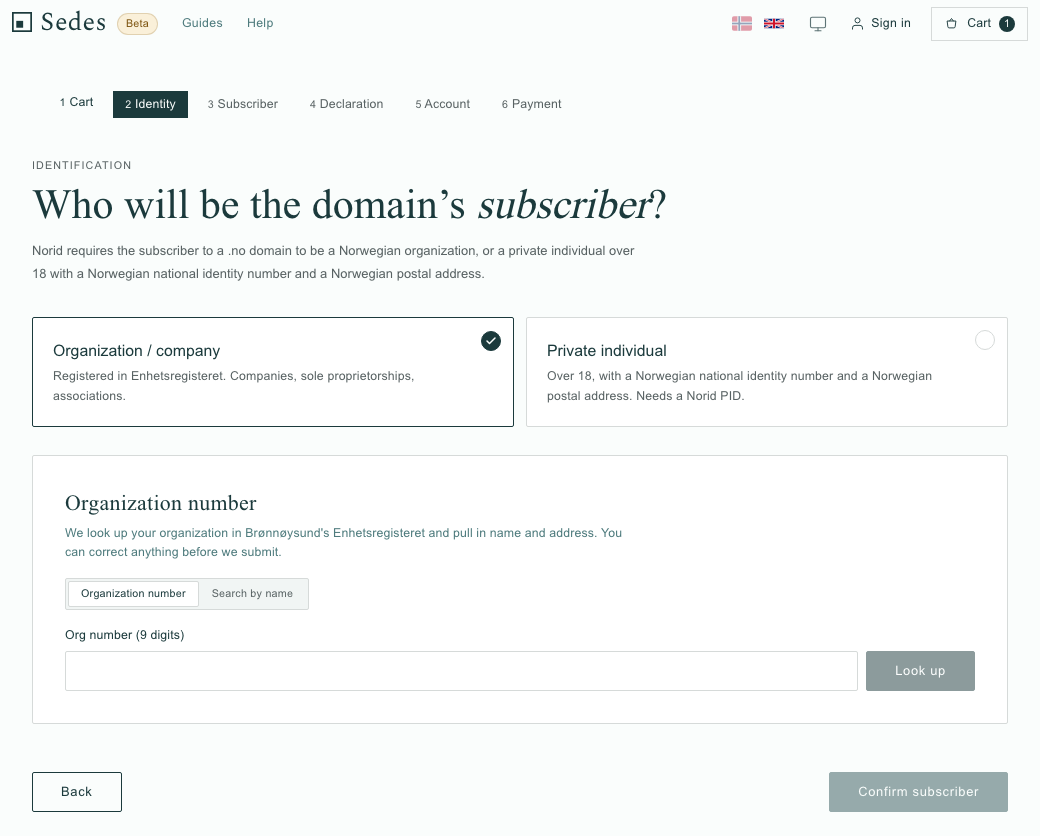
Who will be the domain's subscriber? The subscriber is the person or organisation the domain is registered to. Choose one:
- Organization / company: type the nine-digit organisation number and press Look up, or use Search by name. We fetch the name and address from Enhetsregisteret, and you can correct them.
- Private individual: paste your personal ID into Norid PID. It starts N.PRI. followed by digits, and we check it against Norid before the order is sent.
Press Confirm subscriber.
Subscriber
The Subscriber contact info step asks you to check the contact details: first name, last name, postal address, postcode, city and email, with phone optional. Norid uses this email address when its rules require it to contact the subscriber, for example when the subscriber or registrar changes.
WHOIS, the public lookup of who holds a domain, shows the subscriber's contact details but not the legal contact person's name. A tick box hides your email address there; it is recommended for individuals and ticked by default for a private subscriber. Press To declaration.
Declaration
This is Norid's self-declaration, in full and word for word. It is in Norwegian even on the English page, because the text is Norid's and we cannot change it. Tick the box to accept it and press Sign and continue. For an individual, the box also confirms you are over 18; for an organisation, that you have the authority to enter into agreements on its behalf. One signature covers every name in your cart. What it commits you to is in What Norid requires of you.
Account
You cannot order without a Sedes account, because that is where you manage the domain afterwards. Sign in with Google or with your email address; if you have no account, one is created there and then. Press To payment.
Payment
The step is headed Confirm order and shows the payment methods your order can use: card (Visa or Mastercard, processed by Stripe) or an invoice by email as a PDF. Organisations can also choose EHF, the electronic invoice format; individuals cannot. Vipps is not offered.
Before you finish, you tick a box accepting that the order is binding. The step says: "The order is binding — domain registration is fully delivered the moment we register it, so the right of withdrawal lapses (Norwegian Right of Cancellation Act §22 c)."
Press Complete order. If you pay by card, you then enter the card on the same page and press Pay now. The invoice option says the invoice is due 14 days after registration.
If something stops you before payment
For each of these, try the fix first; if you are still stuck, write to hei@sedes.no with the name and the step you are on.
- The name is taken. The order starts only from a free name, so try another. If it is a .no you already hold, see "Already have a .no elsewhere?" below.
- The organisation number is not found. Check the nine digits, or use Search by name. A deleted company, or an organisation form Norid does not accept, cannot be the subscriber.
- The personal ID is refused. Check you pasted the whole ID as Norid sent it, starting N.PRI. If yours went unused for six months, Norid has deleted it; make a new one at pid.norid.no.
- The card is declined, or you back out of card payment. Nothing is charged, and the order is kept unpaid. The page says "The payment couldn’t be completed. Check your card details and try again."
What happens once I have paid?
When am I charged?
Not when you press the button.
By card: the amount is reserved on your card, not taken. We take it once Norid has registered the domain, and if you ordered several names, only for the ones that are registered.
By invoice or EHF: nothing is invoiced at checkout. The invoice is issued once the domain is registered, only for the names that were registered, and it comes in a separate email from Fiken, our accounting system.
How long until the domain is registered?
Usually a few minutes, as our confirmation page and email tell you. You need not keep the page open: the registration runs on our side, not in your browser.
Once the payment is confirmed, the confirmation page says we are setting up your domain and that there is nothing you need to do. Meanwhile we create the domain's DNS zone on our nameservers, wait until it answers, and then send the registration to Norid with the self-declaration you signed.
When Norid has registered it, the page says the domain is live, and from then it is registered to you for one year. Go to my account takes you to where you manage it.
When it takes longer
Two things can hold it up at Norid:
- The name is contested. If several applications for the same name arrive at once, Norid decides by lottery. If you lose, you are not charged.
- Norid reviews the registration manually.
In both cases the page says so, and we email you when Norid has decided.
If the domain is not registered
The page and an email say something went wrong and that you have not been charged. A card reservation is released, though it can take a few days to disappear from your account, depending on your bank. On an invoice order no invoice is sent, and none will come. We do not retry a refused name; to try again, start a new search. If you think something is wrong, reply to that email or write to hei@sedes.no; both reach the same inbox.
Which emails will I get?
Our order emails are in Norwegian only for now, whatever language you ordered in, so here are their subjects in English. They go to your account's email address.
- "Bestillingen er mottatt: … settes opp" ("Order received: … is being set up"), once payment has gone through, with what is reserved or will be invoiced.
- "… er ditt · kvittering …" ("… is yours · receipt …"), if you paid by card: the domain is registered and this is your receipt. Its Administrer … ("Manage …") button goes straight to the domain in your account.
- "… er registrert" ("… is registered"), if you chose invoice or EHF. The invoice follows from Fiken.
- "Betalt · faktura …" ("Paid · invoice …"), once an invoice has been paid.
- "Vi kunne ikke fullføre bestillingen av …" ("We could not complete the order for …"), if the registration fails.
- "Bekreft e-postadressen din" ("Confirm your email address"), if you created your account with an email address; the order does not wait for it.
No order email is sent before payment has gone through, and none if you cancel an unpaid order.
Why is there no website or email on the domain yet?
Because neither has been set up. A new domain sits on our nameservers with no records for a website or email until you add them. That is expected, not a fault.
What each setting does is in Your domain's DNS settings, explained. For a website, start with A record or CNAME record or Connect your domain to Shopify. For email, Set up email on your domain, or Forwarding or your own address if you only want mail passed on to an inbox you already have.
Where do I manage the domain afterwards?
At app.sedes.no, under My account, signed in with the same Google login or email address you used in the order. Your domains are listed under Domains; open one, and the DNS and Email tabs are where the website and email are set up.
Short questions
Can I cancel the order?
Before you pay, yes: while the order is unpaid, every step has Cancel the order under it, and nothing is charged or registered. After you have paid, no: the order is binding, as the payment step says.
I never got to payment. What now?
The order is kept. In the same browser, the Cart button at the top of sedes.no takes you back to it for up to three days. We do not send a reminder or a link by email.
Can I order a domain for someone else?
The domain is registered to the subscriber named in the Identity step. What that means is in What Norid requires of you. To hand a domain over to someone else later, see Give your domain to a new holder.
Already have a .no elsewhere?
If your .no is at Domeneshop, moving a domain from Domeneshop to Sedes covers the transfer, and Move the .no, keep your other domains covers moving only the .no while your other domains stay at Domeneshop.
How this actually works
Norid only registers a .no that has at least two working nameservers set up for it when the application arrives. That is why we build the domain's DNS zone on our own nameservers first and send the registration only once the zone answers.
Norid sends its decision to us as your registrar, and we pass it on to you. Norid takes no payment from you directly.