Your domain's DNS settings, explained
Your domain's DNS settings decide where your website and email live, and prove that the domain is yours. At Sedes they are in the DNS tab, and a new domain has none for a website or email until you add them. Here is what each of them does.
Published 8 October 2026
Les denne på norskA DNS record is one setting on your domain: it tells the rest of the internet where your website and email are, or proves to a service that the domain is yours. Sedes and most other services call them DNS records; Shopify's Norwegian admin, for example, says DNS-oppføringer. This page explains what each type does.
The screenshots show Sedes in Norwegian. If you use Sedes in English (the language switch in the menu), the labels are the ones in brackets.
These are the five types you will meet most often:
| Type | What it does | Where you meet it |
|---|---|---|
| A | Points a name to an IPv4 address, the usual kind of IP address | Website: almost every website service |
| AAAA | Points a name to an IPv6 address, the newer kind | Website: services that support IPv6, such as Shopify |
| CNAME | Points a name to another name. Not allowed on the domain itself | Website: www and names such as shop. Email: DKIM with Microsoft 365 |
| MX | Says which service receives email for the domain. The server with the lowest Prio (Priority) is tried first | Email: Google Workspace, Microsoft 365 and others |
| TXT | Free text that other services read | Email (SPF, DMARC, often DKIM) and codes that prove the domain is yours |
The guide for each service tells you which of these you need, with the values, for example Connect your domain to Shopify. The rarer types are at the bottom of this page.
What is in a DNS record?
Every DNS record has four parts, in the same order as the columns at Sedes:
- Vertsnavn (Host): which part of the domain the record covers.
@means the domain itself. - TTL: how many seconds other DNS servers may use the answer before they ask again.
- Type: what kind of record it is, such as A or MX.
- Data: the value, usually an address or a name the record points to.
MX records also have a number under Prio. More on that under email.
One example from our test domain is the record @ 3600 A 23.227.38.65. It says that the domain itself points to the IP address 23.227.38.65, which is Shopify's, and that other DNS servers may use the answer for 3600 seconds, which is an hour.
Who answers when someone looks up my domain?
The nameservers. They are the machines that answer when a browser or an email service asks where your domain is. Domains registered at Sedes use the nameservers ns1.sedes.no to ns4.sedes.no, and as long as your domain uses them, the records in the DNS tab at Sedes are the ones that count.
Norid runs the register for every .no domain (what Norid requires of you). The register records which nameservers each domain uses, and that is how the rest of the internet finds its way to the nameservers at Sedes. You change your records at Sedes, not at Norid.
You can see which nameservers your domain uses in the Navnetjenere (Nameservers) tab. The same tab says whether the domain is signed with DNSSEC: «DNSSEC signerer domenet kryptografisk og beskytter mot forfalskede DNS-svar.» (DNSSEC signs the domain cryptographically and protects against forged DNS answers.) Our test domain said Signert (Signed) from the start, without us doing anything, and Shopify connected the domain without us touching DNSSEC.
If you switch to another provider's nameservers, the records at the new provider are the ones that count, and what is in the DNS tab at Sedes no longer has any effect.
Why is the DNS table empty on a new domain?
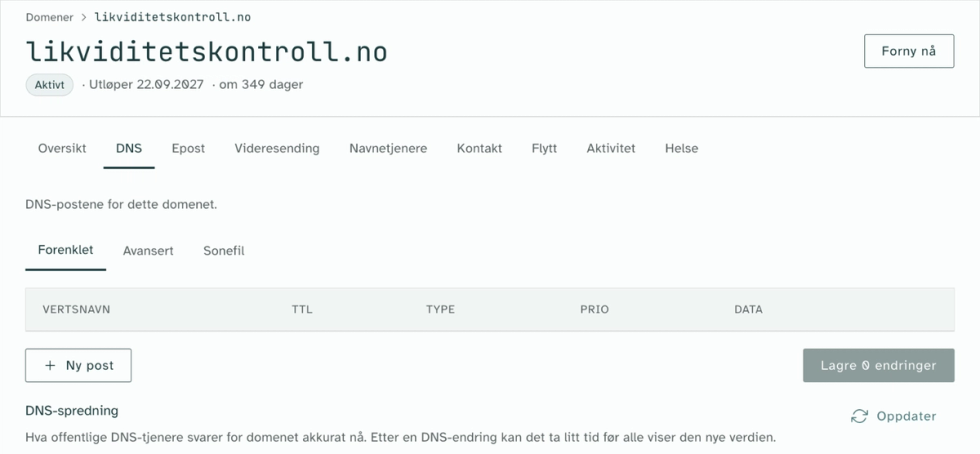
From the moment the domain is registered at Sedes, it points to the nameservers at Sedes, and they answer for it. But the only records you see are four NS records saying which nameservers the domain uses. They are in the Avansert (Advanced) view, so in the Forenklet (Simple) view the table is empty. This is how our test domain looked before we added anything:
If you don't have a domain yet, you can find an available .no domain.
Should my website use an A record or a CNAME?
Most website services ask for these:
- An A record for the domain itself, with the service's IP address.
- Often also an AAAA record for the domain itself, with the service's IPv6 address.
- A CNAME record for
www, with a name at the service, such asshops.myshopify.com.
The domain itself cannot have a CNAME record. That is a rule of DNS, and the reason services ask for A and AAAA on @, but a CNAME on www.
Some services ask for an ANAME record on the domain itself instead of an A record. Sedes then looks up the name you enter and answers with the address it points to. Only use it if the service asks for it.
If one host name has several A records, the nameservers return all of them, and each visitor ends up at one of them. So if an old A record is left next to the new one, some visitors reach the old address. That is why Shopify and others ask you to delete old A records first.
Which DNS records does email need: MX, SPF, DKIM and DMARC?
To receive email, the domain needs one or more MX records. If you have several, the number under Prio decides the order. Our test domain has one: @ 3600 MX 1 smtp.google.com.
To keep the email you send out of recipients' spam folders, your email provider will usually ask you for three more records:
- SPF is a TXT record on the domain itself that says which services are allowed to send email from your domain. It starts with
v=spf1. - DKIM is a key the recipient uses to check that the email really came from you and was not changed on the way. Google Workspace uses a TXT record, Microsoft 365 uses CNAME records. The host name looks something like
google._domainkeyorselector1._domainkey. - DMARC is a TXT record with the host name
_dmarc. It tells the recipient what to do with email that fails the SPF and DKIM checks, and where to send reports about it.
The MX records have nothing to do with your website. When you connect the domain to a new website, leave them alone.
What is the TXT record for verifying my domain?
Google Search Console, Meta, Microsoft and many others ask you to add a TXT record containing a code, to prove that the domain is yours. When the service finds the code, it knows you have access to the domain's settings. On our test domain we added a made-up example code: google-site-verification=eksempelkode123 (eksempelkode is Norwegian for "example code").
The record does no harm. Leave it in place: some services check it again later, and Google asks you to keep it even after verification is done.
What do @ and www mean in the host name?
| Vertsnavn (Host) | Covers |
|---|---|
| @ | The domain itself, yourdomain.no |
| www | www.yourdomain.no |
| shop | shop.yourdomain.no, and likewise for other names |
| _dmarc | _dmarc.yourdomain.no, a record email services read |
Names that start with an underscore, such as _dmarc and selector1._domainkey, are not addresses anyone visits. They are places where email services look for particular records. Enter them exactly as the service gives them, but only the part before your domain. If the service says _dmarc.yourdomain.no, you enter _dmarc.
Which DNS records should I not delete?
Do not delete the NS records for the domain itself. They are in the Avansert (Advanced) view. Norid regularly checks that the domain's nameservers answer correctly. Without them, your website and email can stop working.
If you don't recognise a record, leave it, or ask us at hei@sedes.no before you delete it.
What is TTL?
DNS servers around the internet keep the answers they get, so they don't have to ask the nameservers every time. TTL is how many seconds they may use such a cached answer before they ask again.
New records at Sedes get 3600 seconds, which is an hour, unless you change it. The NS records are set to 172,800 seconds, two days. You will almost never need to change TTL.
How long do DNS changes take to propagate?
A brand-new record usually works within minutes. A changed record can take as long as its old TTL, which at Sedes is usually an hour. If you switch nameservers, it can take up to two days.
The reason is that the nameservers at Sedes answer with the new records as soon as you have confirmed the changes in Se over endringene (Review changes). What Sedes calls DNS propagation (DNS-spredning) is the time it takes for other DNS servers to stop using an old answer they have cached.
There is one exception for new records: if someone looked the name up before you added the record, they may have cached the answer "does not exist" for up to an hour. We saw this with a DMARC record on our test domain: right after saving, Google answered with the new record, while Cloudflare was still answering "does not exist".
When we added three records for Shopify on the test domain, Google and Cloudflare answered with them the first time we checked, within a minute. Shopify's "up to 48 hours" is the worst case, not what you should expect.
Under DNS-spredning in the DNS tab, you can see what Google, Cloudflare and other large DNS servers are answering for the domain right now. Click Oppdater (Refresh) to check again.
Where do I find the DNS settings at Sedes?
Open the domain under Domener (Domains) and choose the DNS tab. It has three views of the same records.
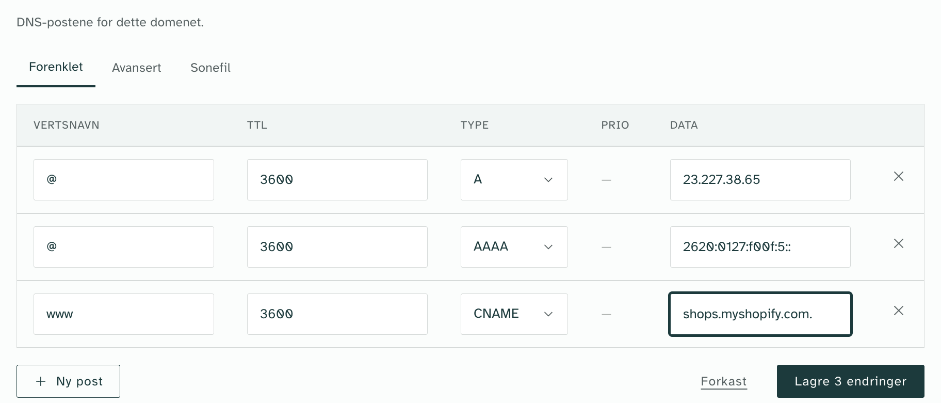
Forenklet shows records of the types A, AAAA, ANAME and CNAME. This is where most website guides start. Here is the test domain with the three records for a Shopify store:
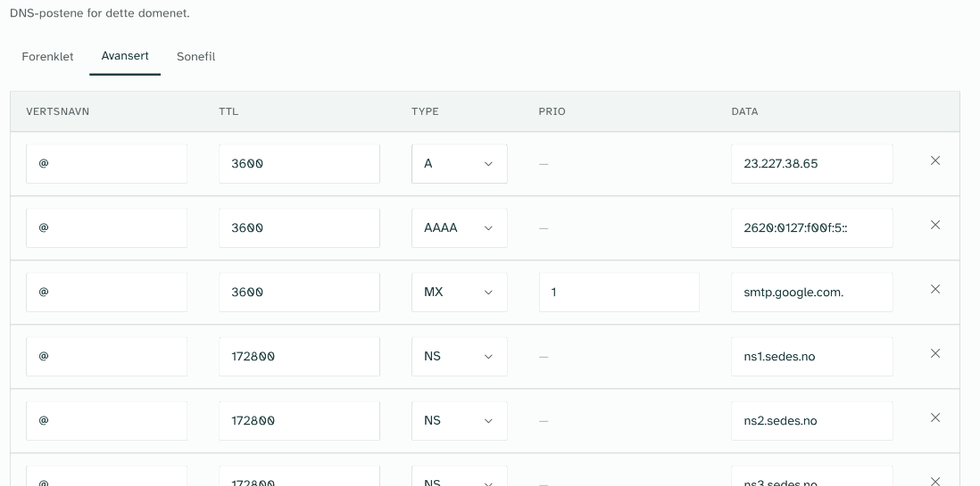
Avansert shows every record, including MX, TXT and NS. This is where you find the MX and TXT records for your email. If your email provider uses CNAME records, as Microsoft 365 does, those also appear in Forenklet.
Sonefil (Zone file) shows the records as text, the way DNS files look. You can copy the text with the icon at the top right or download it with Last ned (Download), for example to keep a copy before you change anything.
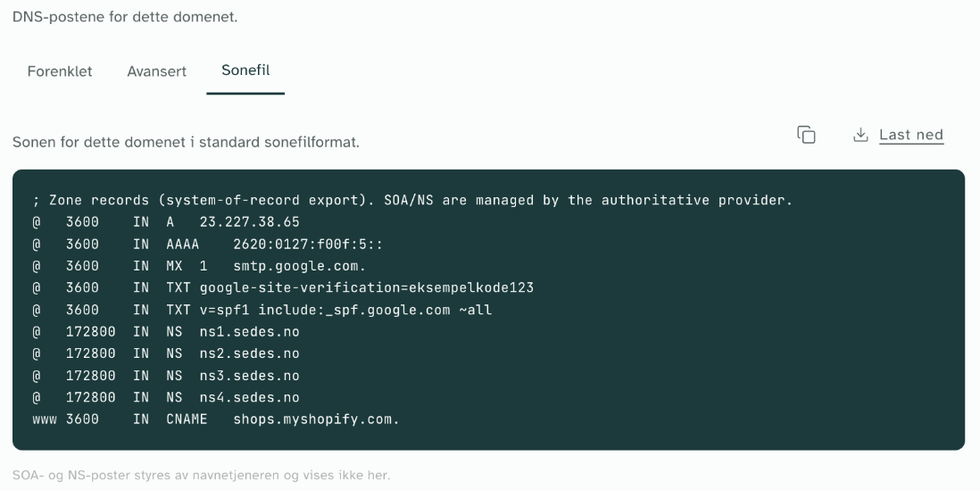
When we took the screenshots, the test domain had three records for the website at Shopify, an MX record for email at Google, an SPF record and an example code for verifying the domain.
What other types of DNS record are there?
You will rarely meet these. Together with the five at the top, they are every type you can add in the Avansert view at Sedes, plus SOA, which the nameservers create themselves.
| Type | What it does | Where you meet it |
|---|---|---|
| ANAME | Works like a CNAME, but is allowed on the domain itself. Sedes looks the name up and answers with the address | Website: some services ask for it instead of A |
| NS | Says which nameservers answer for the domain | There from the start. Don't delete them |
| SRV | Says where a particular service is found, with priority, weight and port | Some phone and chat services, and older Microsoft 365 setups |
| CAA | Says which companies may issue a TLS certificate (what gives you https) for the domain | Rare. A wrong CAA record can stop a certificate being issued or renewed, so https stops working on your website |
| HTTPS and SVCB | Give browsers information on how best to connect to the service | New types, rarely in guides yet |
| PTR | Looks up in the opposite direction, from IP address to name | Almost never on a domain. It belongs to whoever has the IP address |
| SOA | Basic information about how the domain is set up on the nameservers | Managed by the nameservers. You don't see it at Sedes and don't need to touch it |
Sources: Norid: the role of the domain name system in service delivery (in Norwegian), Norid on the role of a registrar and Norid's domain name policy for .no, including its requirements for nameservers. The TTL values and the time for "does not exist" were read from the nameservers at Sedes on 8 October 2026. The examples and timings are from our test domain the same day. Sedes is provided by Lightbulb Solutions AS.